Actualizar los inventarios de Multi Inventory con WP All Import
Además de nuestra API REST, puede usar WP All Import para importar varios inventarios en sus productos de WooCommerce. Distinguimos entre un solo archivo de stock y varios archivos.
Importar un solo archivo de stock
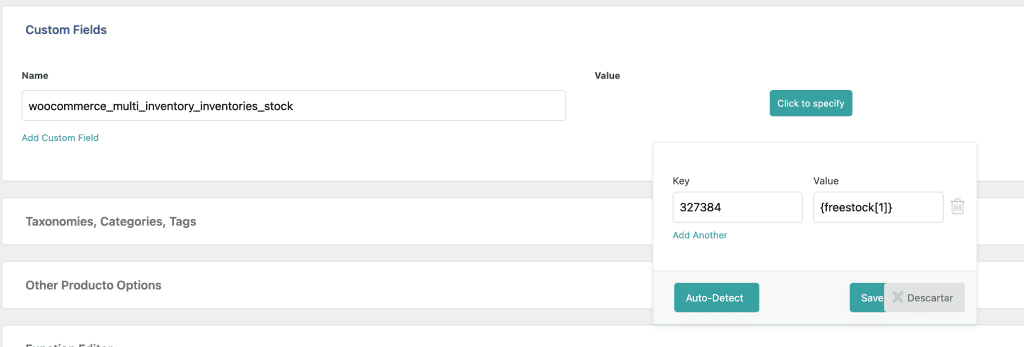
Para importar un archivo de stock, use los campos personalizados (Custom Fields) de WP All Import. Ponga como nombre «woocommerce_multi_inventory_inventories_stock». Asegúrese de que es un array y defina la clave y el valor como en la imagen de abajo.
Nota: la clave es el ID del término del almacén.
Después añada el siguiente código al archivo functions.php de su tema hijo. Así los términos y taxonomías de los almacenes se actualizan correctamente durante la importación.
function welaunch_update_inventory_stock( $post_id, $meta_key, $meta_value) {
    if($meta_key == "woocommerce_multi_inventory_inventories_stock") {
        $product = wc_get_product($post_id);
        if(!$product) {
            return false;
        }
        if(!is_array($meta_value)) {
            die('Inventories data must be an array');
        }
        $meta_value = array_filter($meta_value);
        $productId = $product->get_id();
        if($product->get_type() == "variation") {
            $parentProduct = wc_get_product( $product->get_parent_id() );
            if(!$parentProduct) {
                return false;
            }
            $product = $parentProduct;
        }
        $existingTerms = get_the_terms($product->get_id(), 'inventories');
        if(!empty($existingTerms)) {
            $existingTerms = wp_list_pluck($existingTerms, 'term_id');
            $existingTerms = array_combine($existingTerms, $existingTerms);
            foreach($meta_value as $inventory_id => $inventory_stock) {
                if(empty($inventory_stock) && isset($existingTerms[$inventory_id]) ) {
                    unset($existingTerms[$inventory_id]);
                } elseif($inventory_stock > 0 && !isset($existingTerms[$inventory_id]) ) {
                    $existingTerms[$inventory_id] = $inventory_id;
                }
            }
        } else {
            $existingTerms = array_keys($meta_value);
        }
        wp_set_post_terms($productId, $existingTerms, 'inventories');
        $product->save();
    }
}
add_action( 'pmxi_update_post_meta', 'welaunch_update_inventory_stock', 10, 3 );
Importar varios archivos de stock
Con varias importaciones y archivos de stock, usted controla el ID del almacén manualmente. Vea el código de abajo. Ajuste estos parámetros en el script:
- import id (el ID de la tarea de WP All Import)
- inventoryId (el ID del término del almacén, en Productos > Inventories)
- stockKey (la clave de stock en su archivo XML / CSV)
function welaunch_update_inventory_stock( $post_id, $xml_node, $is_update ) {
    // Retrieve the import ID.
    $import_id = (int) wp_all_import_get_import_id();
    $inventoryId = 0;
    $stockKey = '';
    // inventory import ONE
    // import id 359 = inventory 5957
    if ( $import_id == 359 ) {
        $inventoryId = 5957;
        $stockKey = 'stock_amount';
    // inventory import TWO
    // import id 335 = inventory 5956
    } elseif ( $import_id == 335 ) {
        $inventoryId = 5956;
        $stockKey = 'free_stock';
    }
    if(empty($inventoryId)) {
        return;
    }
    // Convert SimpleXml object to array for easier use.
    $record = json_decode( json_encode( ( array ) $xml_node ), 1 );
    if(!isset($record[$stockKey])) {
        return;
    }
    $stock = (int) $record[$stockKey];
    $product = wc_get_product($post_id);
    if(!$product) {
        return false;
    }
    $existingInventoryStock = $product->get_meta('woocommerce_multi_inventory_inventories_stock');
    if(empty($existingInventoryStock)) {
        $existingInventoryStock = array(
            $inventoryId => $stock
        );
    } else {
        $existingInventoryStock[$inventoryId] = $stock;
    }
    // var_dump($existingInventoryStock);
    // die();
    $newTotalFrontendStock = 0;
    foreach($existingInventoryStock as $inventoryId => $stockAmount) {
        $frontend = get_term_meta($inventoryId, 'woocommerce_multi_inventory_frontend', true);
        if($frontend) {
            $newTotalFrontendStock += (int) $stockAmount;
        }
    }
    $product->set_stock_quantity($newTotalFrontendStock);
    $product->update_meta_data('woocommerce_multi_inventory_inventories_stock', $existingInventoryStock);
    $product->save();
    // Update Terms
    $productToGetTermsFrom = $product;
    $productId = $product->get_id();
    if($product->get_type() == "variation") {
        $productToGetTermsFrom = wc_get_product( $product->get_parent_id() );
        if(!$productToGetTermsFrom) {
            return false;
        }
    }
    $existingTerms = get_the_terms($productToGetTermsFrom->get_id(), 'inventories');
    if(!empty($existingTerms)) {
        $existingTerms = wp_list_pluck($existingTerms, 'term_id');
        $existingTerms = array_combine($existingTerms, $existingTerms);
        foreach($existingInventoryStock as $inventory_id => $inventory_stock) {
            if(empty($inventory_stock) && isset($existingTerms[$inventory_id]) ) {
                unset($existingTerms[$inventory_id]);
            } elseif($inventory_stock > 0 && !isset($existingTerms[$inventory_id]) ) {
                $existingTerms[$inventory_id] = $inventory_id;
            }
        }
    } else {
        $existingTerms = array_keys($existingInventoryStock);
    }
    wp_set_post_terms($productToGetTermsFrom->get_id(), $existingTerms, 'inventories');
    $product->save();
}
add_action( 'pmxi_saved_post', 'welaunch_update_inventory_stock', 10, 3 );
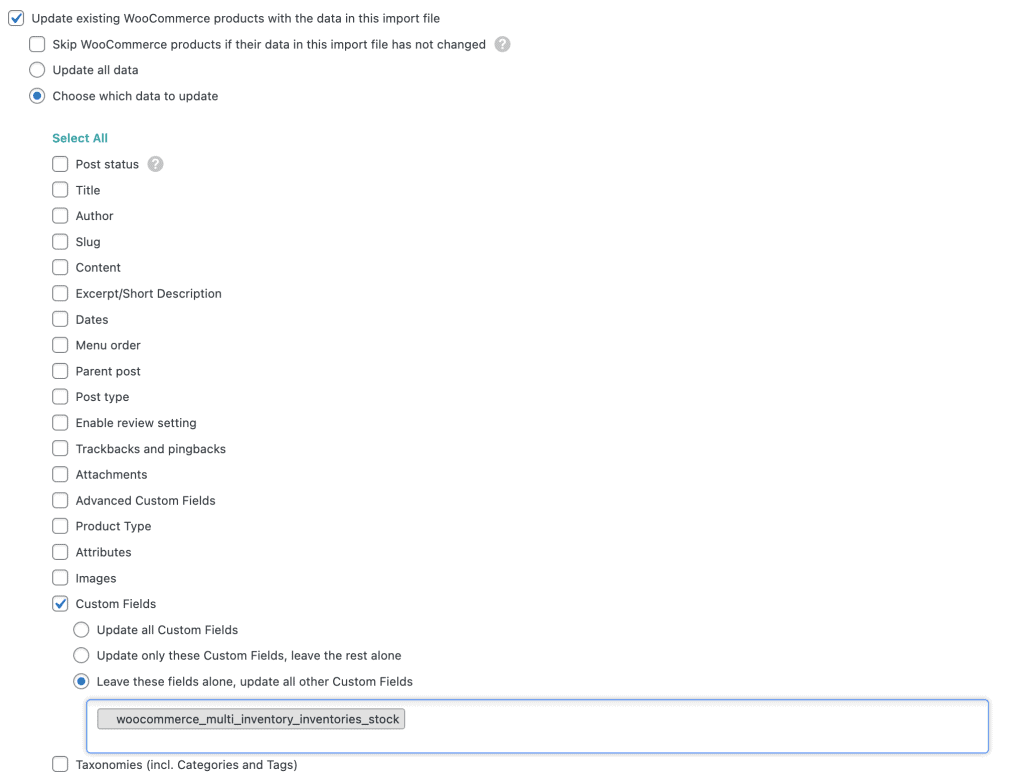
Por defecto, WP All Import sobrescribe todos los campos meta personalizados. Para evitarlo, elija: actualizar todas las metas excepto «woocommerce_multi_inventory_inventories_stock». Vea el ejemplo de configuración de abajo.