WC Multi Inventory bijwerken met WP All Import
Naast onze REST API kun je ook WP All Import gebruiken om meerdere magazijnen in je WooCommerce-producten te importeren. We maken onderscheid tussen één voorraadbestand en meerdere bestanden.
Eén importbestand
Om één voorraadbestand te importeren, gebruik je eigen velden in WP All Import. Stel de naam in op “woocommerce_multi_inventory_inventories_stock”. Zorg dat het een array is en klik om de sleutel en de waarde aan te geven, zoals in de afbeelding hieronder.
Let op: de sleutel is het ID van de magazijnterm.
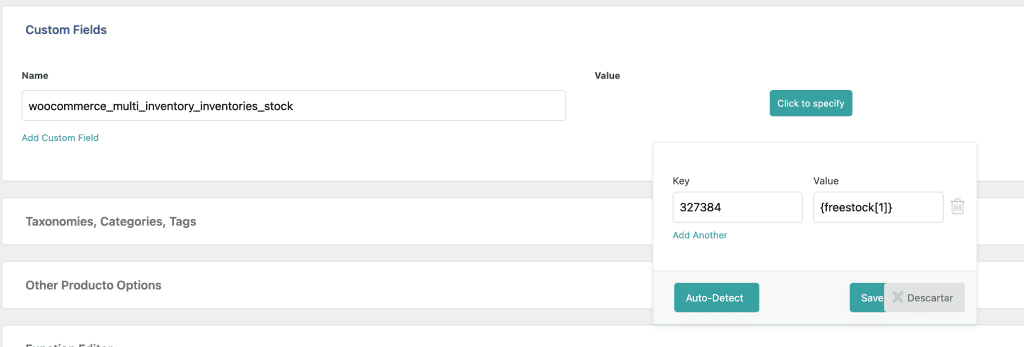
Zet daarna de volgende code in de functions.php van je childthema. Die zorgt dat magazijntermen en -taxonomieën tijdens de import goed worden bijgewerkt.
function welaunch_update_inventory_stock( $post_id, $meta_key, $meta_value) {
    if($meta_key == "woocommerce_multi_inventory_inventories_stock") {
        $product = wc_get_product($post_id);
        if(!$product) {
            return false;
        }
        if(!is_array($meta_value)) {
            die('Inventories data must be an array');
        }
        $meta_value = array_filter($meta_value);
        $productId = $product->get_id();
        if($product->get_type() == "variation") {
            $parentProduct = wc_get_product( $product->get_parent_id() );
            if(!$parentProduct) {
                return false;
            }
            $product = $parentProduct;
        }
        $existingTerms = get_the_terms($product->get_id(), 'inventories');
        if(!empty($existingTerms)) {
            $existingTerms = wp_list_pluck($existingTerms, 'term_id');
            $existingTerms = array_combine($existingTerms, $existingTerms);
            foreach($meta_value as $inventory_id => $inventory_stock) {
                if(empty($inventory_stock) && isset($existingTerms[$inventory_id]) ) {
                    unset($existingTerms[$inventory_id]);
                } elseif($inventory_stock > 0 && !isset($existingTerms[$inventory_id]) ) {
                    $existingTerms[$inventory_id] = $inventory_id;
                }
            }
        } else {
            $existingTerms = array_keys($meta_value);
        }
        wp_set_post_terms($productId, $existingTerms, 'inventories');
        $product->save();
    }
}
add_action( 'pmxi_update_post_meta', 'welaunch_update_inventory_stock', 10, 3 );
Meerdere magazijnbestanden importeren
Werk je met meerdere imports en magazijnbestanden, dan beheer je het magazijn-ID handmatig. Zie de code hieronder en pas deze parameters in het script aan:
- import id (het ID van de WP All Import-taak)
- inventoryId (het ID van de magazijnterm, te vinden onder Producten > Magazijnen)
- stockKey (de voorraadsleutel in je XML- / CSV-bestand)
function welaunch_update_inventory_stock( $post_id, $xml_node, $is_update ) {
    // Retrieve the import ID.
    $import_id = (int) wp_all_import_get_import_id();
    $inventoryId = 0;
    $stockKey = '';
    // inventory import ONE
    // import id 359 = inventory 5957
    if ( $import_id == 359 ) {
        $inventoryId = 5957;
        $stockKey = 'stock_amount';
    // inventory import TWO
    // import id 335 = inventory 5956
    } elseif ( $import_id == 335 ) {
        $inventoryId = 5956;
        $stockKey = 'free_stock';
    }
    if(empty($inventoryId)) {
        return;
    }
    // Convert SimpleXml object to array for easier use.
    $record = json_decode( json_encode( ( array ) $xml_node ), 1 );
    if(!isset($record[$stockKey])) {
        return;
    }
    $stock = (int) $record[$stockKey];
    $product = wc_get_product($post_id);
    if(!$product) {
        return false;
    }
    $existingInventoryStock = $product->get_meta('woocommerce_multi_inventory_inventories_stock');
    if(empty($existingInventoryStock)) {
        $existingInventoryStock = array(
            $inventoryId => $stock
        );
    } else {
        $existingInventoryStock[$inventoryId] = $stock;
    }
    // var_dump($existingInventoryStock);
    // die();
    $newTotalFrontendStock = 0;
    foreach($existingInventoryStock as $inventoryId => $stockAmount) {
        $frontend = get_term_meta($inventoryId, 'woocommerce_multi_inventory_frontend', true);
        if($frontend) {
            $newTotalFrontendStock += (int) $stockAmount;
        }
    }
    $product->set_stock_quantity($newTotalFrontendStock);
    $product->update_meta_data('woocommerce_multi_inventory_inventories_stock', $existingInventoryStock);
    $product->save();
    // Update Terms
    $productToGetTermsFrom = $product;
    $productId = $product->get_id();
    if($product->get_type() == "variation") {
        $productToGetTermsFrom = wc_get_product( $product->get_parent_id() );
        if(!$productToGetTermsFrom) {
            return false;
        }
    }
    $existingTerms = get_the_terms($productToGetTermsFrom->get_id(), 'inventories');
    if(!empty($existingTerms)) {
        $existingTerms = wp_list_pluck($existingTerms, 'term_id');
        $existingTerms = array_combine($existingTerms, $existingTerms);
        foreach($existingInventoryStock as $inventory_id => $inventory_stock) {
            if(empty($inventory_stock) && isset($existingTerms[$inventory_id]) ) {
                unset($existingTerms[$inventory_id]);
            } elseif($inventory_stock > 0 && !isset($existingTerms[$inventory_id]) ) {
                $existingTerms[$inventory_id] = $inventory_id;
            }
        }
    } else {
        $existingTerms = array_keys($existingInventoryStock);
    }
    wp_set_post_terms($productToGetTermsFrom->get_id(), $existingTerms, 'inventories');
    $product->save();
}
add_action( 'pmxi_saved_post', 'welaunch_update_inventory_stock', 10, 3 );
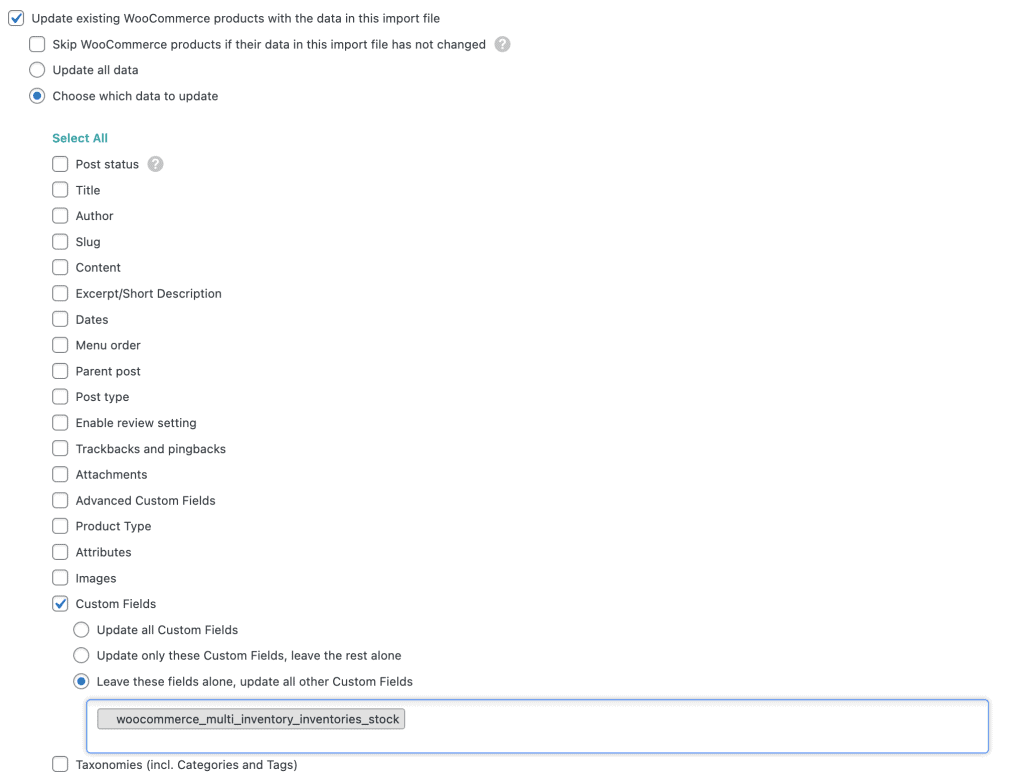
WP All Import overschrijft standaard alle eigen meta. Om dat te voorkomen kies je: alle meta bijwerken behalve “woocommerce_multi_inventory_inventories_stock”. Zie het configuratievoorbeeld hieronder.