WordPress-Plugin zur Länderauswahl einrichten
Einstellungen-Panel
Zuerst sollten Sie sicherstellen, dass Sie die Einstellungen der Länderauswahl sehen können. Wenn Sie das Menü auf dem rechten Bild nicht sehen können, stellen Sie bitte sicher, dass Sie das Redux Framework Plugin installiert haben.
Allgemeine Einstellungen
Die allgemeinen Einstellungen der Länderauswahl erlauben es Ihnen, das Plugin zu aktivieren. Dann können Sie eine Cookie-Lebensdauer festlegen (z. B. 60 Tage), bevor das Popup erneut bei Ihren Besuchern erscheint. Setzen Sie diesen Wert auf 0 (Null) und er wird jedes Mal auftreten.Danach können Sie eine Standard-URL des Landes festlegen (z. B. Ihre internationale Website). Wenn Sie die Option “Force Redirect” aktivieren, werden Besucher automatisch auf die richtige Länderseite umgeleitet. Hier können Sie auch eine Zeit in Sekunden einstellen, wann die Umleitung erfolgen soll.Die letzte Option ermöglicht es Ihnen, Ihre Länderauswahl-Seite innerhalb eines Modals anzuzeigen, wenn jemand auf das Länderauswahl-Widget klickt.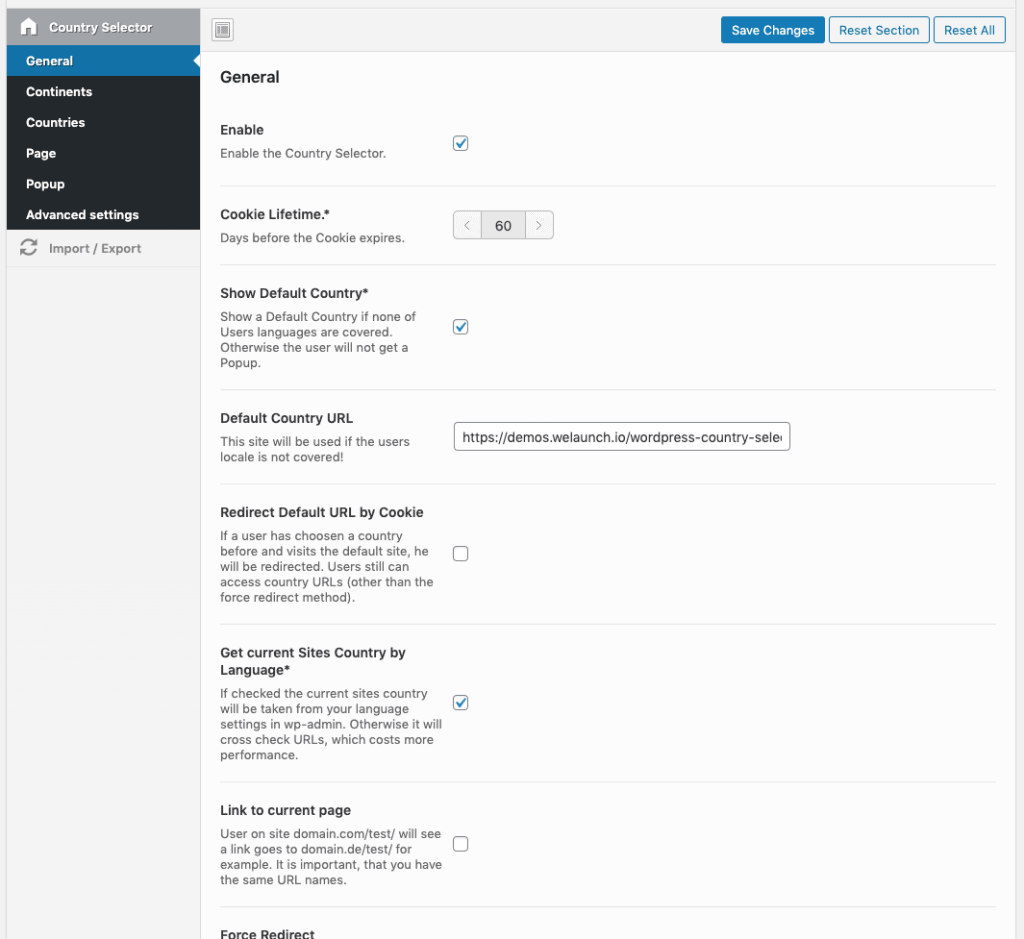
Kontinente aktivieren
Kontinente in diesem Abschnitt aktivieren oder deaktivieren. Diese werden auf der Seite der Länderauswahl angezeigt, wenn Sie sie aktiviert haben.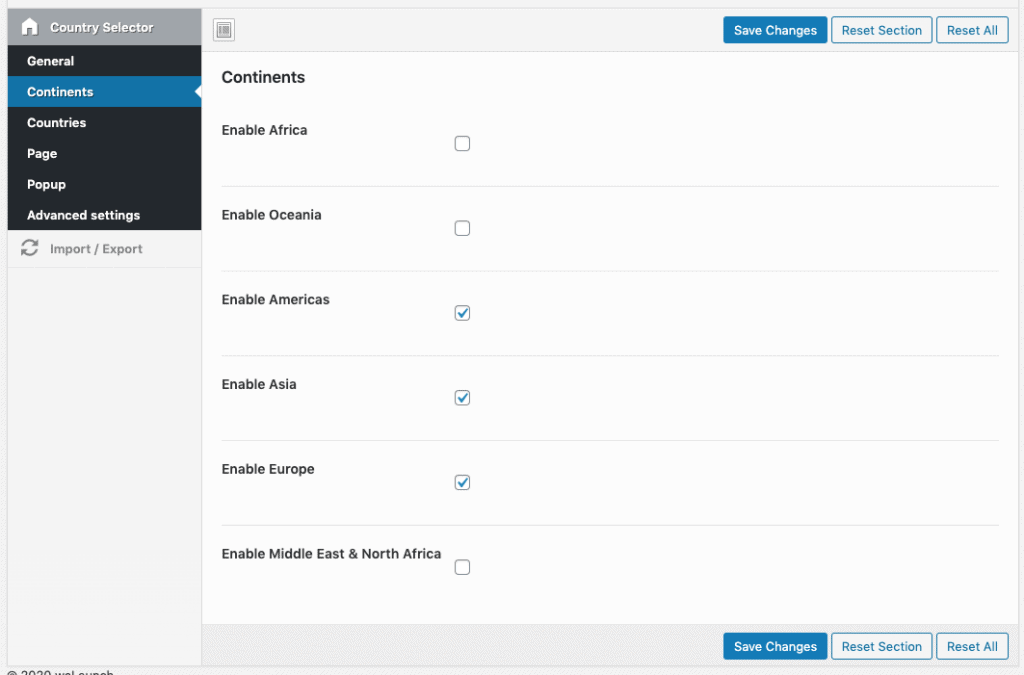
Stellen Sie Ihre Länder ein
Im Länder-Panel können Sie Ihre Länder-URL für jedes Land einstellen. Länder sind nach Kontinenten geteilt. Wenn Sie also eine URL namens “http://www” haben.Beispiel.com/de/” dann setzen Sie dies in das deutsche Länderfeld. Oder auch in den Bereich Österreich + Schweiz, wenn dies für alle deutschsprachigen Besucher gilt.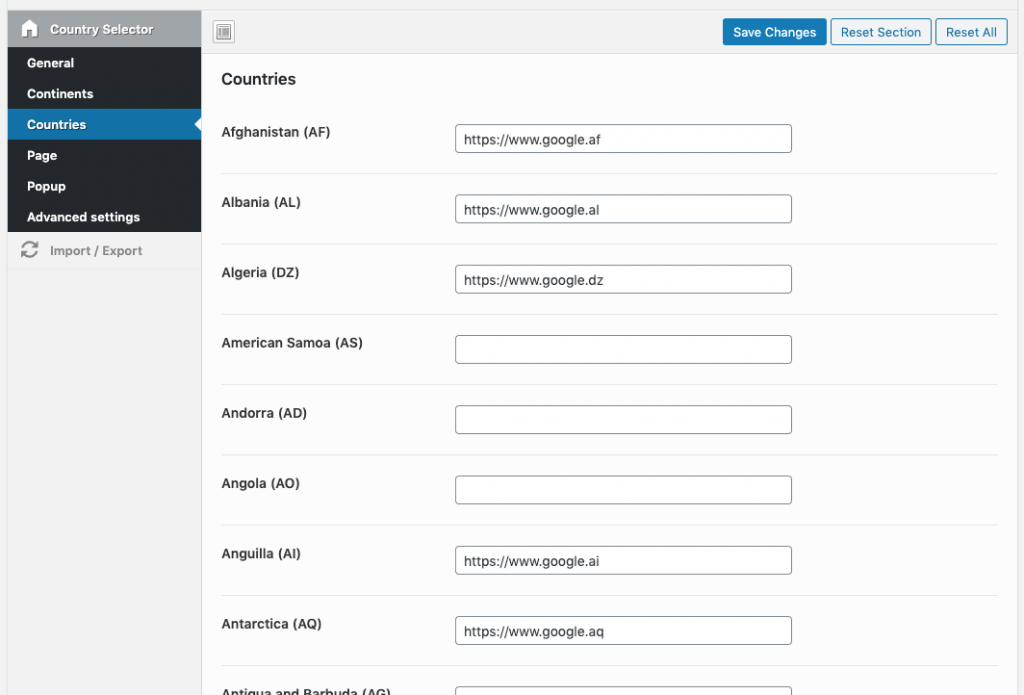
Einstellungen der Länderauswahl-Seite
Die Seite mit der Länderauswahl zeigt alle Länder an, die Sie zuvor festgelegt haben. Seite erstellen und diesen Shortcode dort platzieren [wordpress_country_selector]. Dann sollten Sie die URL dieser Seite in den Einstellungen.Danach können Sie auch einige Stile für die Seite festlegen (nebeneinander, Listenstil oder Dropdown). Neben dem allgemeinen Stil können Sie wählen, ob Sie Flaggen zeigen wollen und welchen Flaggenstil (einfach oder kreisförmig wie Apfel). Und Sie können wählen, ob Sie eine Mini-Länderkarte vor dem Land anzeigen möchten.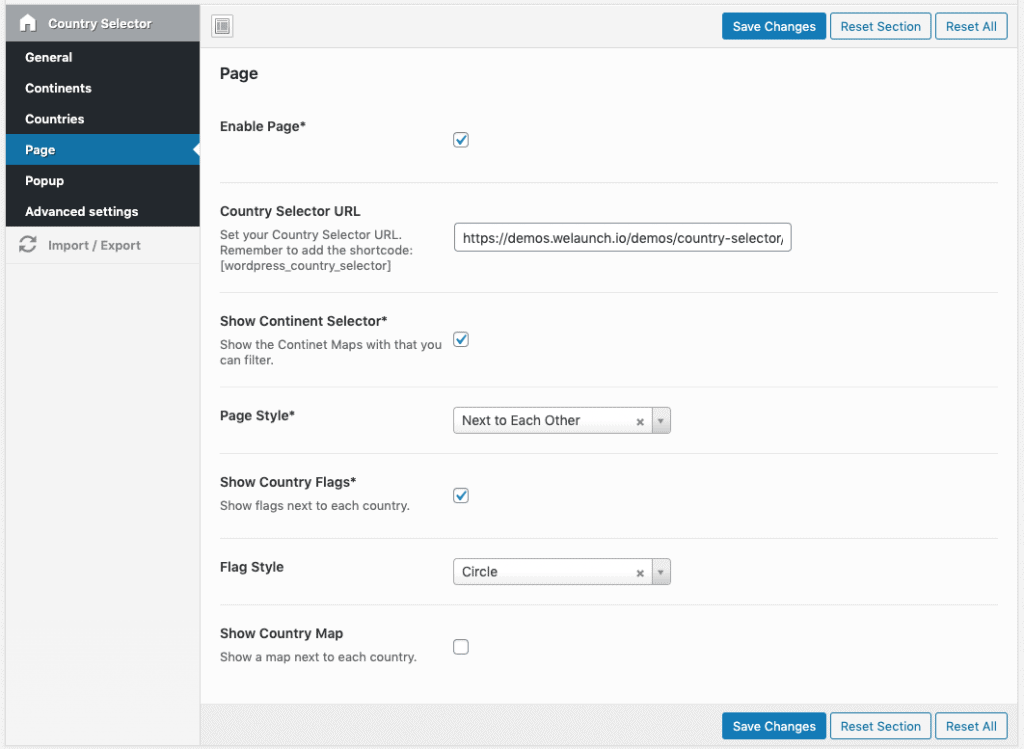
Popup / Modale Einstellungen
In den Popup-Einstellungen können Sie das Modal aktivieren / deaktivieren. Dann können Sie einige Stile anwenden, wie den Popup-Stil (Kopfzeile=100% Breite), modale Größe, Text & Hintergrundfarbe.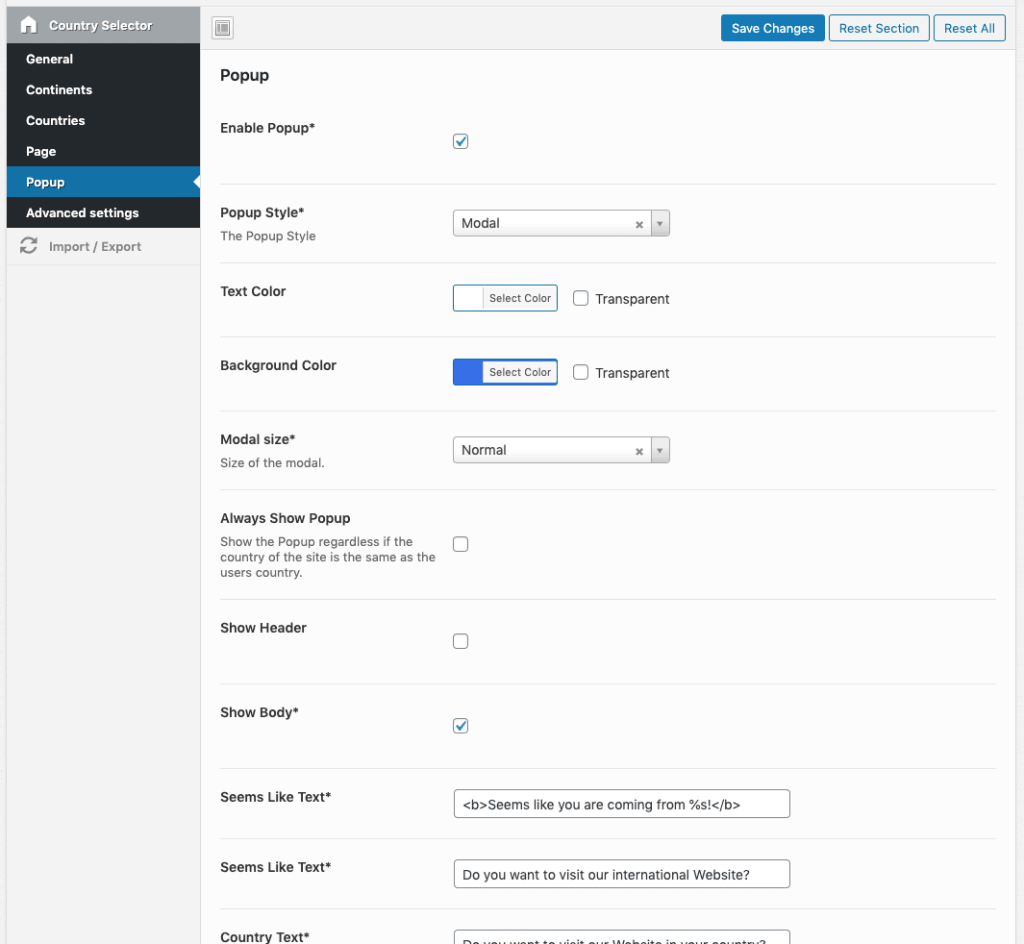
Erweiterte Einstellungen
Fügen Sie benutzerdefiniertes CSS hinzu und deaktivieren Sie Bootstrap, wenn Sie Probleme mit dem Thema haben.
Fragen & Antworten (27)
Josh1. August 2020
Hi there, i can’t get the plugin working. I have activated the plugin and am trying to set-up the force redirect. e.g for UK to go to samvega.co.uk. Would love some help
Daniel Barenkamp3. August 2020
What exactly is not working? Please be more specific or send us some screenshots + purchase code to [email protected]
Alex25. Mai 2020
Hello,
We use your plugin for our site but we customized it a little bit for our needs.
Is there any possibility to detect the visitors country and pre-select it in a the drop down menu.
You can see how it is now on this link https://www.maestoso-design.com/?lang=en
Thank you very much.
Have a great day,
Alex
WeLaunch26. Mai 2020
Your site gives us a too many redirect error. But we do not support 3rd party customizations by default. Only on charge.
Ali Siblini23. April 2020
Hello, i have installed wordpress country selector however, the popup is showing also for people from same country to go to their country… in other words, People from France for example, are having popup to go to France, while they are using french ip and location, there is an option at the plugin says always show popup, its OFF and not on, i tried to turn it on and off again but no hope.. is that a bug? or how to fix ? need urgent help please!
Arc7. Mai 2020
I have the same problem, please reply urgently.
WeLaunch8. Mai 2020
You need to make sure your site URL is 1:1 exactly the same as in our plugin settings. So https://www.example.com should be https://www.example.com, and NOT: https://example.com (www removed) or https://www.example.com/ (trailing slash)
Juan Pablo8. April 2020
How can i erase “Americas” and also center the countries at the middle of the text box?
Thanks!
swati23. März 2020
Ist es möglich, das Popup nur für zwei Länder anzuzeigen?
WeLaunch23. März 2020
Ja, natürlich können Sie nur 2 Länder einstellen.
swati27. März 2020
But from where i can set this? i Didn’t find such options in setting.
WeLaunch27. März 2020
In Ländereinstellungen.
Love Kumar5. Februar 2020
can i get the drop on header menu instead of popups
WeLaunch5. Februar 2020
What you mean with drop? Like a dropdown menu? Yes you can use our shortcodes for this.
karsan23. Dezember 2019
Suddenly the Modal has started opening on other pages than then home page even after selecting the country on homepage Modal Pop up.
The Next Pop up allows the the pop to be ignored by clicking outside and it disappears and then does not bother. But until then…
Jose5. Februar 2019
I purchased the plugin few months ago, I now I’m trying to use but I cannot see the “settings menu” The redux frameworks is installed and activated
How could I solve the problem to configure the plugin in my site
Bhautik Kikani26. November 2018
I have problem for pop up modal. please give me full description about that.
WeLaunch26. November 2018
What problem exactly?
Rachel Palmer27. Oktober 2018
I can’t get this to work how you have described. I am trying to set it up with a dropdown list but no matter what I try it won’t work.
WeLaunch28. Oktober 2018
Have you used our shortcode?
Stuart Bermingham11. Oktober 2018
I’m using the country dropdown shortcode but it’s showing ‘International’ as selected when I’m actually on the Canadian site?
WeLaunch11. Oktober 2018
Please send wp-admin to [email protected]
Mark Kingsley-Monks8. Oktober 2018
Hi,
I’ve installed the plug in (and the Redux plug in) and followed the instructions but nothing happens.
Please advise.
Mark
WeLaunch8. Oktober 2018
Hi there,
what do you think it would happen? Or what are you expecting? Have you enabled the plugin in settings menu?
Noel Earvin Piamonte10. Oktober 2018
Hi there. The popup modal to select the country doesn’t seem to work on my client’s website. Any idea what may be the issue? “Enable the Country Selector.” is enabled on the settings page of “Wordpress Country Selector”.
I have the same exact settings as on your setup above.
Jose5. Februar 2019
Hello, I have the same issue with the settings menu, it does not appears on my WP Panel, I have installed the redux framework and is is activated, but I cannot see the menu
Jose5. Februar 2019
I have the same problem, redux is installed and activated but I don’t have the settings menu to configure the plugin